Phonly — It's only a phone

Family phone management

A school phone.
A home phone.
Not a smartphone.

Phonly returns your child's device to its original purpose: it's a tool, not a toy. No social media, no web browsing, no games, EVER.

Our unique School Mode switches your child's phone between a locked-down, school-safe communication device and a pre-set selection of utility and enrichment-focused apps on a programmable schedule. It’s the perfect balance for parents to manage, children to use, and schools to support.

Built for Real Family Routines

  • Scheduled Modes

    Set School Mode windows once, or enroll in a schedule managed by your child's institution. Devices follow the schedule automatically without daily reminders or mandatory logins.

  • Parent Dashboard

    Check device status, location, and mode at a glance — or switch manually when plans change.

  • Limited, by Design

    Parents can choose from three Home Mode profiles: Utility, Enrichment, and Entertainment. No customization means no negotiating for yet another app.

Phonly Devices

Home Mode Profiles

When School Mode is on, your child's phone is limited to call, text, contacts, calendar, and clock. When School Mode is off, parents choose one of three pre-defined Home profiles:

  • Utility

    In addition to School Mode, Utility adds camera, calculator, Google Translate, Google Maps, Google Health, Waze, and Life360*.

  • Enrichment

    In addition to Utility Mode, Enrichment adds Audible*, Kindle*, Amazon Music*, and Spotify*.

  • Entertainment

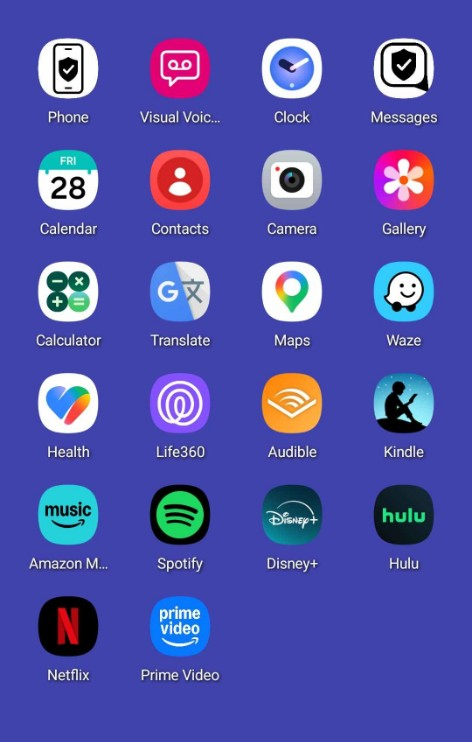
    In addition to Enrichment Mode, Entertainment adds Disney+*, Hulu*, Prime Video*, and Netflix*.

* Additional subscription required.

Phonly Entertainment home screen, showing the allowed app grid

How It Works

  1. Ready off-the-shelf

    Your Phonly device is pre-configured with MDM software and a cellular data plan. Open the box and make a call.

  2. Define or enroll in a schedule

    Parents (or school administrators) configure when each mode applies, and children cannot override or escape from it.

  3. Parents log in and stay informed

    Use the parent app to see what’s happening and take control when you need to.

Join Phonly Today!

Ready for Phonly? Enter your email and we’ll follow up to answer your questions or start your onboarding process.